1,011 AI crawler requests. Google Analytics saw zero
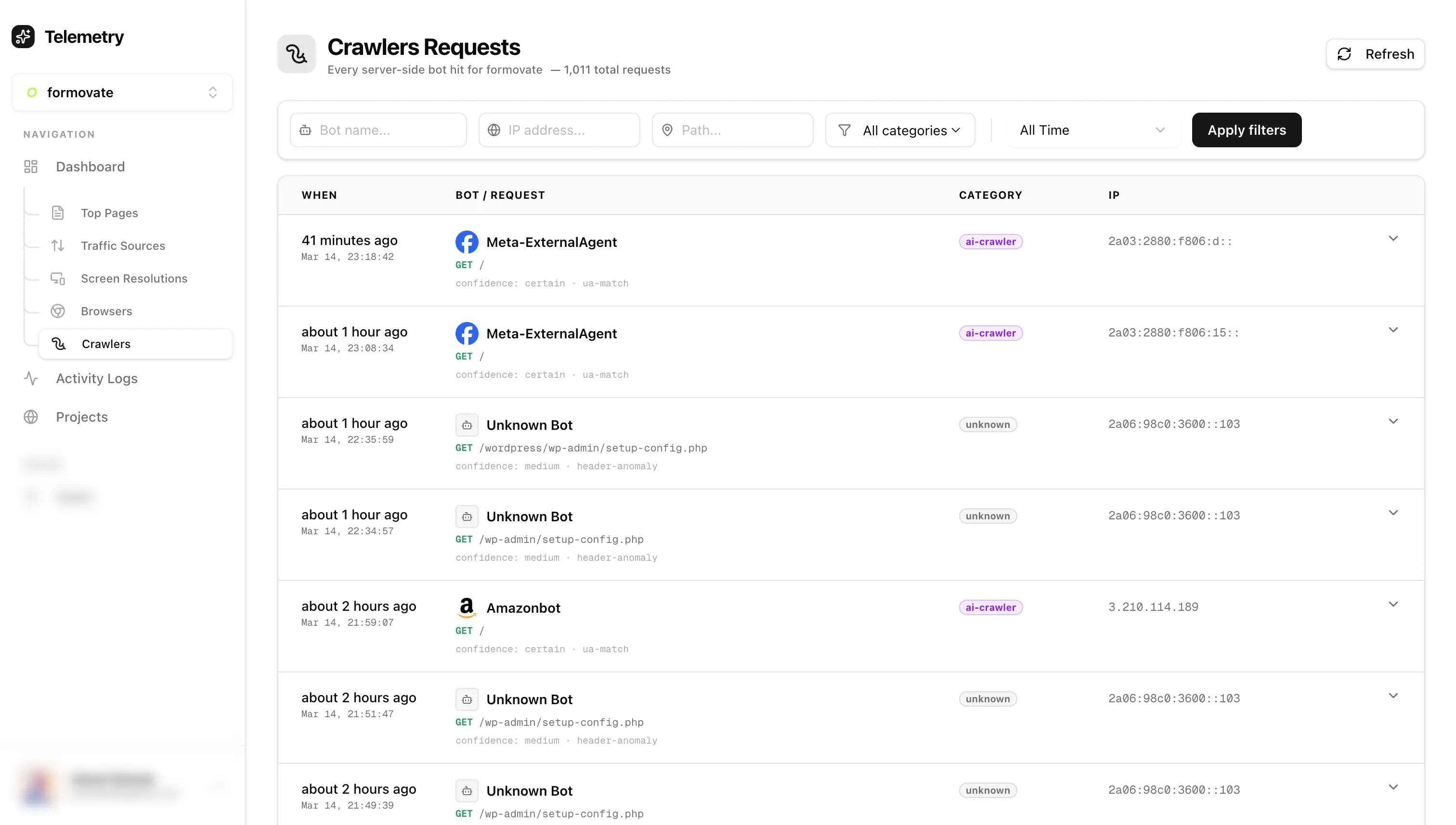
Some requests were hitting my pages, downloading only the HTML, and leaving. No JS, no CSS, no images. It turned out it was GPTBot & ClaudeBot.
Most analytics tools never see these visits because they rely on JavaScript beacons & fetch, and these crawlers never execute JavaScript.
So I started digging into how these bots work and eventually built a small tool to detect them server-side. Detecting bots hitting your website is not as simple as you think. But still there are a bunch of ways to identify if the request is coming from a bot. So the agenda is very clear now.
There are majorly 3 methods to detect crawler/bot.
- Client Side detection
- Server Side detection
- Detection over Network Layer
The most easy to implement & understand method is client side detection.
Crawler lands on a page of a website, downloads all the resource files and runs it in a browser-like environment (JS executable environment). So when trackers like Google Analytics, PostHog are used for tracking they can easily identify if it's a bot.
Now I have a very fun experiment for you if you are using Google Analytics, PostHog or something equivalent.
Visit ChatGPT / Claude / Perplexity / Gemini and try asking that LLM to visit your website which has an analytics service attached. As soon as you get the result from the LLM that it has visited your website/domain, check if you got any visitor in your analytics dashboard.
It will be quite fun 😉.
I already know the result but you might wonder:
Why are these traditional web analytics not working?
Is LLM really visiting my site?
And how is it able to retrieve up-to-date information?
The reason is very simple.
LLM bots / crawlers do not execute JavaScript. So the tracking scripts used by most analytics tools never run. That means the visit happened, but your analytics tool never saw it.
For example a request from GPTBot might look something like this:
GET /blog/ai-crawlers HTTP/1.1
User-Agent: GPTBot/1.3
Accept: text/html
Another example from ClaudeBot:
GET /blog/ai-crawlers HTTP/1.1
User-Agent: ClaudeBot
Accept: text/html
So how do we detect traffic coming from such bots?
That's where server side bot detection comes into the picture. This method exists one layer above the traditional one. Instead of relying on JavaScript execution, we detect requests directly at the server level.
Let me break it down.
Let's say you have deployed your website on Vercel, Cloudflare, Netlify or any other hosting service provider.
Whenever a visitor hits your website domain, the hosting provider returns HTML, JS, CSS and all assets related to that page (it's basically a GET request). Even if some bots do not execute JavaScript, they still request the HTML page from the server. And that's how we can capture requests coming from bots.
Most verified bots like GPTBot, ClaudeBot, AhrefsBot etc disclose their identity in headers like: User-Agent & IP Address
For example a GPTBot user-agent looks like this:
Mozilla/5.0 AppleWebKit/537.36 (KHTML, like Gecko; compatible; GPTBot/1.3; +https://openai.com/gptbot)
Here are some IP addresses I recorded while experimenting:
74.7.227.24
74.7.227.44
74.7.227.143
When you switch to server side detection you can detect almost around 85-90% of crawlers hitting your website.
So I experimented and built a small tool which captures and identifies most bots and crawlers. I attached a relatively fresh domain (10-20 visitors per week) with the tool. And In just 72 hours it recorded around ~1,011 bot / crawler requests.
That means bots are crawling websites way more aggressively than most people realize. Interestingly LLM bots were far less aggressive compared to normal scrapers. Some scrapers were hitting the same page repeatedly, while GPTBot and ClaudeBot behaved much more conservatively. While experimenting with this I ended up turning it into a small tool that logs crawler activity server-side.
If anyone is curious to try it on their own site, I put it here:
👉 https://telemetry-dashboard-gilt.vercel.app
Let me quickly explain the process.
After signup, create a new project. You will receive an installation script which you need to insert inside the head tag of your website. To enable server side bot detection you also need to generate a secret. After generating the secret, documentation is provided there itself explaining the rest of the setup. Once setup is complete you can see detected bots and crawlers in the crawler tab.
Note: Server side bot detection will not work for websites deployed purely on CDN platforms like github.io.
But if your site is deployed on Vercel, Cloudflare or something similar, it should work fine. Now if you repeat the earlier experiment (asking an LLM to visit your site), you should be able to see crawler activity recorded as well.
One interesting thing I discovered while experimenting is that bots can fake headers. For example when I asked Grok to visit a website, it did visit, but the request used an iPhone user-agent. I discovered this while checking Vercel server logs.
One way to identify such cases is by looking at the ASN (Autonomous System Number). If you can identify the actual source IP, you can check the ASN using a service like:
So is there a better bot detection method ?
Yes — the third method is detection at the network layer.
But that is a rabbit hole for another post.
For now at least you know what's hitting your site 🫠.