Building My Own Google Analytics for $0
 Prerequisite: You must at least have heard about GA or its use case.
If you are a developer then you would have already encountered GA or equivalent. So without wasting anymore time im gonna waste your time by forcing you to understand how Analytics services (like Google Analytics, Posthog, Cloudflare Web Analytics, etc) actually work.
It's very simple and interesting at same time. Let's say you have a webpage which is hosted on some domain. Now if you want to track views coming on webpage, then If I ask you how would you track (without using analytics services)?
The most common answer would be: Add a viewCounter to page and as soon as someone lands do viewCounter++ OR Built an endpoint to increment counter And that's how simple it is!! Then I thought why not build one for myself.
Reverse Engineering Google Analytics
Before writing code, I like to reverse engineer. Let's hop some website which use GA
As soon as we land on the page, collect request triggers. So there is some client side Script which is being executed after we land on the page and send a request to googleAnalytics server with some payload data.
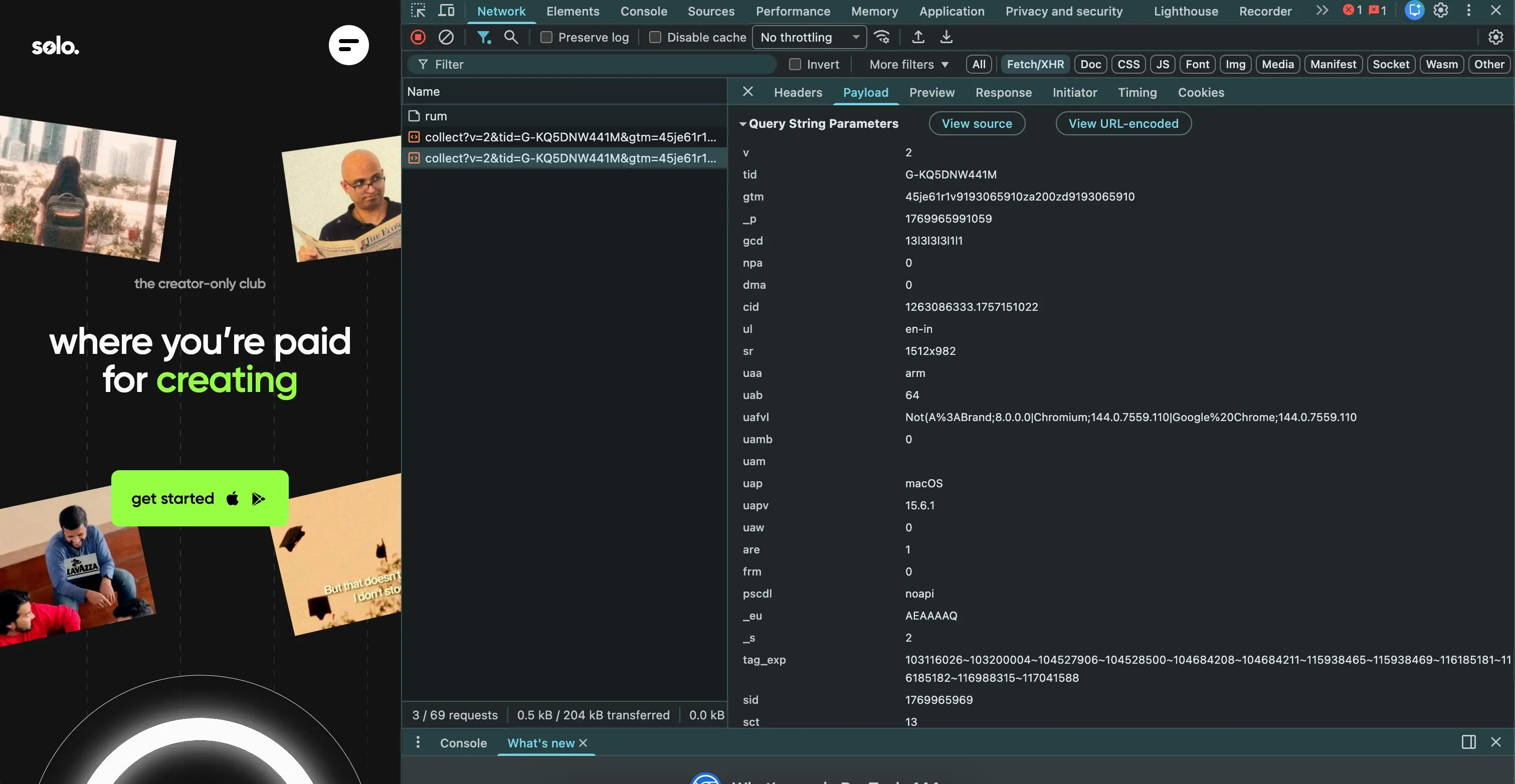
If I try to scroll down the page more collect requests happen, with payload, if i click on any button then again collect request happens.
Do you notice the pattern?
If you play around you will realize collect requests are being done on almost every event.
The Basic Architecture
So we need following components:
User's Browser
    ↓
Tracking Script (track.js)
    ↓
Backend API
    ↓
Database
    ↓
Dashboard
While integrating Google Analytics it provides some code snippets to insert in the head tag.
<script async="" src="https://www.googletagmanager.com/gtag/js?id=YOUR_CODE"></script>
<script>
      window.dataLayer = window.dataLayer || [];
      function gtag() {
        dataLayer.push(arguments);
      }
      gtag("js", new Date());
      gtag("config", "YOUR_CODE");
</script>
Google Analytics provides cdn link of script with your unique G-Tag.
So what exactly happens is if someone lands on a webpage this script is downloaded on client side first, And this script is responsible for calling track endpoint.
Reason of Script is coming from server side it can be kept dynamic (should be able to update without changing code on client side)
Problem 1: CORS Preflight Hell
When I first built this, I made a simple POST request with JSON body:
POST /track
Content-Type: application/json
Body: { "url": "example.com", "sessionId": "abc123" }
Guess what happened?
Every single page view triggered 2 HTTP requests:
- OPTIONS (preflight check)
- POST (actual data) Why? Because browsers send a preflight request for any POST with custom headers or JSON body. That's double the latency for every page view! 💀 For a site with 10,000 daily views, that's 20,000 requests instead of 10,000!
The Solution: I looked at how Google Analytics does it:
https://www.google-analytics.com/collect?v=1&tid=UA-XXX&cid=123&t=pageview...
They put all data in query parameters!
So I changed my approach:
POST /track?url=example.com&sessionId=abc123
Content-Type: text/plain
Body: (empty)
This is a "simple request" - no preflight needed! Now it's just 1 request.
Problem 2: Bots Are Everywhere
When I deployed the first version and checked the data: 12-15% of my traffic was bots! 🤖
Google crawler, Bing crawler, scrapers, automation tools, monitoring services... If I don't filter them, my analytics would be useless.
The Solution: Two-Layer Bot Detection
Layer 1: Client-Side (Lightweight) The tracking script does basic checks:
- Is
navigator.webdriverpresent? (Selenium, Puppeteer) - Does window have automation tool globals? (Cypress, Playwright)
- Is user-agent HeadlessChrome? If yes, mark as bot and send that info to server.
Layer 2: Server-Side (Heavy Lifting) The backend does advanced detection:
- Parse user-agent using isbot library (checks against 1000+ known bot patterns)
- Check Cloudflare headers (
cf-connecting-ip,cf-ipcountry) - Analyze behavioral patterns (too fast clicks, impossible scroll speeds)
But there's a problem... Running bot detection on every request is expensive! My backend is on Render free tier. It goes to sleep after inactivity. If I process bot detection on the main server, it would:
- Waste CPU cycles
- Increase response time
- Cost money (when I scale)
The Better Solution: Cloudflare Worker I deployed a Cloudflare Worker at the edge:
User's Browser
    ↓
Cloudflare Worker (Edge)  ← Bot filtering happens HERE
    ↓
Backend API (Render)      ← Only receives clean traffic
Why Cloudflare Worker?
- Runs at the edge (closer to users = faster)
- Free tier is generous (100,000 requests/day)
- Can access Cloudflare's bot detection headers
- Filters bots before they hit my backend Now my backend only processes real users!
Problem 3: Session Management
Google Analytics doesn't just count page views. It tracks sessions - a session is one person's visit to your site. If you leave and come back 30 minutes later, it's a new session.
How do we implement this?
Option 1: Server-side session tracking Store session expiry in database, check on every request.
Problem: Database query on every page view = slow + expensive
Option 2: Client-side session tracking
Store session ID in sessionStorage (expires when tab closes).
Store last activity timestamp.
On each page view:
- Check if last activity was > 30 minutes ago
- If yes, create new session
- If no, update last activity This is much faster - no database query needed! I went with Option 2 (same as Google Analytics).
Problem 4: SPAs Don't Reload Pages
React, Next.js, Astro - they change content without reloading the page. So how do we track route changes?
The Solution: Intercept History API
Modern frameworks use history.pushState to change routes.
I intercept it in the tracking script to detect route changes.
Also listen to back/forward buttons with popstate event.
Now it works with any SPA framework automatically!
The Final Architecture
Here's what I ended up with:
User's Browser
    ↓
Tracking Script (track.js) - Hosted on Cloudflare CDN
    ↓
Cloudflare Worker - Bot detection, request filtering
    ↓
Backend API - Session management, data processing
    ↓
MongoDB Atlas - Data storage
    ↓
Dashboard - Analytics visualization
If you already read until now, let me tell you something, you have been already tracked 🤣